SeeBloom
SeeBloom / Models / MiniMax H3 Max
AI Video Model

MiniMax H3 Max AI Video Generator — Cinematic Shots with Native Audio

Turn a prompt or a photo into a 5–15 second cinematic clip with sound effects, ambience and dialogue generated together with the picture. Multi-shot storytelling, six aspect ratios and one flat per-second price.

30 free credits on sign-up · Failed jobs refunded

MiniMax H3 Max at a glance

What you can set for each generation on SeeBloom.

Clip length
5–15 seconds per generation
Resolution
480p, 768p (same price)
Aspect ratio
21:9, 16:9, 4:3, 1:1, 3:4, 9:16
Audio
Native sound effects, ambience and dialogue · 24 fps
Inputs
Text-to-video · image-to-video (one reference image)
Price on SeeBloom
4 credits/s at either resolution

Why creators choose MiniMax H3 Max

Where the model stands out compared with other video generators.

Sound in every clip

Thunder, waves, footsteps, voices — H3 Max renders the soundtrack together with the picture, so clips are ready to post without a separate audio pass.

Cinematic multi-shot flow

Describe a wide shot, a close-up and a reveal in one prompt and the model cuts between them with consistent lighting and characters.

Up to 15 seconds

Pick any length from 5 to 15 seconds — long enough for a full beat of a story or a product reveal, and you only pay for the seconds you use.

One simple price

4 credits per second whether you render at 480p or 768p, and no extra charge for image-to-video. A 10-second clip is 40 credits.

MiniMax H3 Max prompt examples

Copy a prompt, open the studio and paste it in — then adjust the subject and details to make it yours.

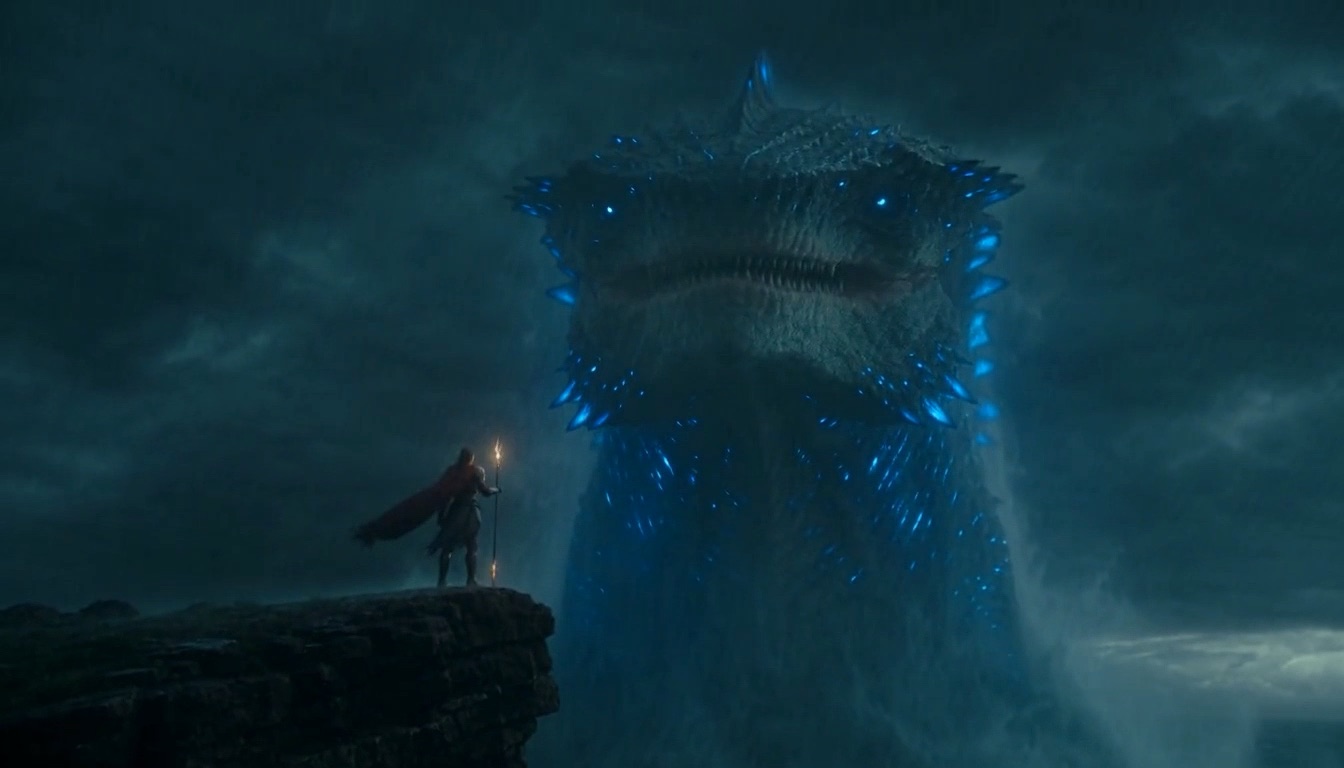
Storm leviathan with native audio
10s · 768p · 16:9 · text-to-video

Storm leviathan with native audio

Dark sci-fi storm epic: on a rain-lashed cliff above a black ocean, a lone armored sorceress in a tattered crimson cloak raises a glowing staff as a colossal alien leviathan rises from the waves behind her. Lightning splits the sky, revealing its bioluminescent ridges. Slow push-in from a wide shot to her determined face, then a low-angle reveal of the leviathan towering overhead. Audio: rolling thunder, crashing waves, howling wind, a deep resonant creature roar, and the hum of her staff charging. Cinematic realism, teal and crimson grade, no music, no text, no watermark.
Try it
Prompt idea · 8s · 768p · image-to-video

Bring a street photo to life

Animate the reference photo: the street musician lifts his saxophone and starts to play as evening rain begins to fall. Passers-by slow down, a neon sign flickers on behind him, and the camera slowly circles from his side to the front. Audio: warm saxophone melody, light rain on pavement, distant city traffic. Keep his face and outfit identical to the photo, no text, no watermark.
Try it
Prompt idea · 12s · 768p · 16:9

Three-shot story with dialogue

Three-shot mini story in a snowy mountain cabin at night. Shot 1: wide exterior, warm window glowing in a blizzard. Shot 2: inside, an old man pours tea by the fire and says quietly, "She said she would come back before the snow." Shot 3: close-up of the door as someone knocks three times. Audio: wind howling, fire crackling, his voice, three firm knocks. Cinematic, 16:9, no music, no text, no watermark.
Try it

How to make a MiniMax H3 Max video

Three steps, no software to install.

1

Write the scene

Describe the shots in order, the camera moves and the mood. List the sounds you want to hear and put any spoken line in quotes.

2

Add a photo (optional)

Upload one image to use as the starting frame. Choose 5–15 seconds, 480p or 768p, and an aspect ratio.

3

Generate and download

Clips usually render in under a minute. Download the MP4 with sound, or merge several clips in your library.

MiniMax H3 Max pricing

MiniMax H3 Max is billed per second of output: about $0.20/s at the base rate (20 credits = $1), the same at 480p and 768p.

ExampleRateTotal
5s · 768p4 credits/s20 credits
10s · 768p4 credits/s40 credits
15s · 768p4 credits/s60 credits

Image-to-video costs the same as text-to-video. Failed generations are refunded automatically.

Frequently asked questions

About MiniMax H3 Max on SeeBloom.

What is MiniMax H3 Max?

MiniMax H3 Max is a video generation model from MiniMax (the team behind Hailuo AI). It creates cinematic clips with natively generated audio from text or a single image.

Does MiniMax H3 Max generate sound?

Yes. Every clip includes generated audio — sound effects, ambience and voices. Describe the sounds in your prompt and add “no music” if you want a cleaner track.

How long can a MiniMax H3 Max video be?

Each generation is 5 to 15 seconds. For longer edits, generate several clips and merge them in your SeeBloom library.

Should I pick 480p or 768p?

Both cost the same per second, so 768p is the better default. 480p is handy when you want slightly faster drafts.

Can I try MiniMax H3 Max for free?

Yes. New accounts get 30 free credits — enough for a 7-second clip at 4 credits per second.

Is SeeBloom affiliated with MiniMax?

No. SeeBloom is an independent platform providing access to MiniMax H3 Max alongside other leading models.

Start creating with MiniMax H3 Max

Sign up to get free credits and generate your first clip in minutes.

Open MiniMax H3 Max in SeeBloom →